
Server-Timing ミドルウェア
Server-Timing ミドルウェアは、レスポンスヘッダーに 性能指標を提供します。
情報
注意:Cloudflare Workers では、計測値が正確でない場合があります。 タイマーは最後の I/O の時刻のみを示すためです。
インポート
ts
import { Hono } from 'hono'
import {
  timing,
  setMetric,
  startTime,
  endTime,
  wrapTime,
} from 'hono/timing'
import type { TimingVariables } from 'hono/timing'
使い方
js
// Specify the variable types to infer the `c.get('metric')`:
type Variables = TimingVariables

const app = new Hono<{ Variables: Variables }>()

// add the middleware to your router
app.use(timing());

app.get('/', async (c) => {

  // add custom metrics
  setMetric(c, 'region', 'europe-west3')

  // add custom metrics with timing, must be in milliseconds
  setMetric(c, 'custom', 23.8, 'My custom Metric')

  // start a new timer
  startTime(c, 'db');
  const data = await db.findMany(...);

  // end the timer
  endTime(c, 'db');

  // ...or you can also just wrap a Promise using this function:
  const data = await wrapTime(c, 'db', db.findMany(...));

  return c.json({ response: data });
});
条件に応じた有効化
ts
const app = new Hono()

app.use(
  '*',
  timing({
    // c: Context of the request
    enabled: (c) => c.req.method === 'POST',
  })
)
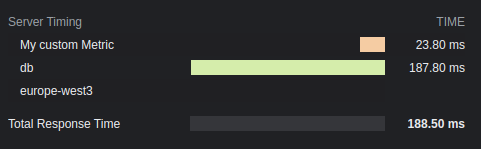
結果
オプション
optional total: boolean
総レスポンス時間を表示します。デフォルトは true です。
optional enabled: boolean | (c: Context) => boolean
ヘッダーに計測結果を追加するかを指定します。デフォルトは true です。
optional totalDescription: string
総レスポンス時間の説明。デフォルトは Total Response Time です。
optional autoEnd: boolean
リクエスト終了時に startTime() のタイマーを自動終了するかを指定します。 無効にした場合、手動で終了していないタイマーは表示されません。
optional crossOrigin: boolean | string | (c: Context) => boolean | string
この計測ヘッダーを読み取れるオリジンを指定します。
- false:現在のオリジンのみ。
- true:すべてのオリジン。
- 文字列:指定したドメイン。複数のドメインはカンマで区切ります。
デフォルトは false です。詳しくはドキュメントを参照してください。