
Server-Timing 中间件
Server-Timing 中间件在响应头中 提供性能指标。
说明
注意:在 Cloudflare Workers 上,计时指标可能不准确, 因为计时器只显示最近一次 I/O 的时间。
导入
ts
import { Hono } from 'hono'
import {
  timing,
  setMetric,
  startTime,
  endTime,
  wrapTime,
} from 'hono/timing'
import type { TimingVariables } from 'hono/timing'
用法
js
// Specify the variable types to infer the `c.get('metric')`:
type Variables = TimingVariables

const app = new Hono<{ Variables: Variables }>()

// add the middleware to your router
app.use(timing());

app.get('/', async (c) => {

  // add custom metrics
  setMetric(c, 'region', 'europe-west3')

  // add custom metrics with timing, must be in milliseconds
  setMetric(c, 'custom', 23.8, 'My custom Metric')

  // start a new timer
  startTime(c, 'db');
  const data = await db.findMany(...);

  // end the timer
  endTime(c, 'db');

  // ...or you can also just wrap a Promise using this function:
  const data = await wrapTime(c, 'db', db.findMany(...));

  return c.json({ response: data });
});
按条件启用
ts
const app = new Hono()

app.use(
  '*',
  timing({
    // c: Context of the request
    enabled: (c) => c.req.method === 'POST',
  })
)
结果
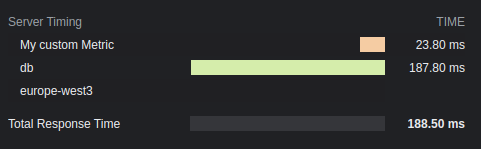
选项
optional total: boolean
显示总响应时间。默认值为 true。
optional enabled: boolean | (c: Context) => boolean
是否将计时信息加入响应头。默认值为 true。
optional totalDescription: string
总响应时间的描述。默认值为 Total Response Time。
optional autoEnd: boolean
是否在请求结束时自动结束 startTime() 启动的计时器。 禁用时,未手动结束的计时器不会显示。
optional crossOrigin: boolean | string | (c: Context) => boolean | string
可以读取此计时响应头的源。
- false:仅允许当前源。
- true:允许所有源。
- 字符串:允许指定域名。多个域名必须用逗号分隔。
默认值为 false。更多详情请参阅文档。